Netbeans automatically uses the Windows system default language as the default user interface language. I believe that it means to be a nice feature for localization. But I personally find it uncomfortable because I have been used with English interface.
After I did some Google search, I learned a few tips to set the Netbeans UI language.
1. Temporary Solution
Add "--locale en:US" at the end of Netbeans startup command.
"C:\Program Files\NetBeans 6.0.1\bin\netbeans.exe" --locale en:US
2. Permanent Solution
Go to Netbeans installation directory, for example,
C:\Program Files\NetBeans 6.0.1\etc
Open "netbeans.conf" and find netbeans default option line
netbeans_default_options="-J-client -J-Xss2m -J-Xms32m -J-XX:PermSize=32m -J-XX:MaxPermSize=200m -J-Xverify:none -J-Dapple.laf.useScreenMenuBar=true"
Add "-J-Duser.language=en -J-Duser.region=US" to the end of this line
netbeans_default_options="-J-client -J-Xss2m -J-Xms32m -J-XX:PermSize=32m -J-XX:MaxPermSize=200m -J-Xverify:none -J-Dapple.laf.useScreenMenuBar=true -J-Duser.language=en -J-Duser.region=US"
It would be nice that there is an option to allow me choose the user interface language in the next Netbeans release.
Tuesday, July 7, 2009


In python, how to read unicode or GBK files
import codecs
infile=codecs.open(infilename,"r","gbk")
line=infile.readline()
# all the lines which are read from infile are encoded in GBK
infile=codecs.open(infilename,"r","gbk")
line=infile.readline()
# all the lines which are read from infile are encoded in GBK
Saturday, July 4, 2009
In Java, how do I set a default character encoding for file I/O operations
The default encoding used by locale/encoding sensitive API in the Java libraries is determined by the System property "file.encoding". This system property is initialized by the JVM startup code after querying the underlying native operating system. For example on my English USA NT box it is initialized to:
Cp1252
It is generally recommended that you do not modify it. However if you know what you are doing you could override the system property either on the command line using the -
java -Dfile.encoding=GBK -jar Speech.jar
syntax or programmatically at startup.
Cp1252
It is generally recommended that you do not modify it. However if you know what you are doing you could override the system property either on the command line using the -
java -Dfile.encoding=GBK -jar Speech.jar
syntax or programmatically at startup.
Friday, July 3, 2009
Adding a DOS cmd prompt to the Windows right click menu
1.
Go to the HKEY_CLASSES_ROOT\Folder\shell node in the registry (note that Folder includes drives and directories).
2.
Create a new key (from the right-click menu), and call it "DOS prompt".
3.
Under that new key, create a sub-key named "command".
4.
Under that new key (i.e under HKEY_CLASSES_ROOT\Folder\shell\DOS prompt\command), edit the (Default) String value and give it the following value: "c:\windows\system32\cmd.exe %1" (or whatever the path to cmd.exe is on your system).
5.
Now, you can open a DOS window by right-clicking on any directory name in the Windows explorer.
Go to the HKEY_CLASSES_ROOT\Folder\shell node in the registry (note that Folder includes drives and directories).
2.
Create a new key (from the right-click menu), and call it "DOS prompt".
3.
Under that new key, create a sub-key named "command".
4.
Under that new key (i.e under HKEY_CLASSES_ROOT\Folder\shell\DOS prompt\command), edit the (Default) String value and give it the following value: "c:\windows\system32\cmd.exe %1" (or whatever the path to cmd.exe is on your system).
5.
Now, you can open a DOS window by right-clicking on any directory name in the Windows explorer.
Wednesday, July 1, 2009
In Java, how to change the encoding of files
These days, I have a task to change the file whose encoding is UTF-8 into a file with encoding of GBK.
I found a very useful tutorial at:
http://www.herongyang.com/unicode/jdk_encoding_conversion.html
As a summary, you can directly use the following Java code:
String cfilename="";
String outCnFileName="";
BufferedReader cfile = new BufferedReader( new InputStreamReader(new FileInputStream(cfilename),"UTF-8") );
BufferedWriter outcnfile = new BufferedWriter( new OutputStreamWriter(new FileOutputStream(outCnFileName),"GBK") );
String line=cfile.readLine();
while( line!=null )
{
outcnfile.write(line+"\n");
}
cfile.close();
outcnfile.close();
I found a very useful tutorial at:
http://www.herongyang.com/unicode/jdk_encoding_conversion.html
As a summary, you can directly use the following Java code:
String cfilename="";
String outCnFileName="";
BufferedReader cfile = new BufferedReader( new InputStreamReader(new FileInputStream(cfilename),"UTF-8") );
BufferedWriter outcnfile = new BufferedWriter( new OutputStreamWriter(new FileOutputStream(outCnFileName),"GBK") );
String line=cfile.readLine();
while( line!=null )
{
outcnfile.write(line+"\n");
}
cfile.close();
outcnfile.close();
Tuesday, June 30, 2009
How to check a file's encoding under Linux
Use the following command:
file $file_name
For example:
$ file cn.txt
cn.txt: UTF-8 Unicode text, with CRLF line terminators
file $file_name
For example:
$ file cn.txt
cn.txt: UTF-8 Unicode text, with CRLF line terminators
Monday, June 29, 2009
How to add printer to your Fedora in School of Computing of NUS
Open the menu System -> Administration -> Printing
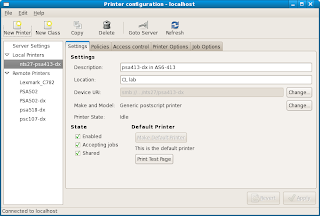
Press the New Printer button
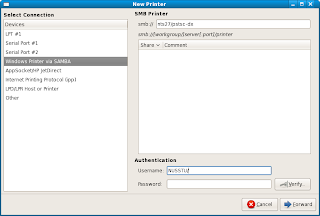
And select "Windows Printer via SAMBA"
Input the smb address "nts27/pstsc-dx" ( if you are a student of SoC and the printer name "pstsc-dx" is the one in Level 1 of COM1)
Then press Forward button
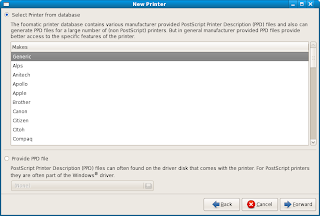
You can directly use the "Generic" and click the Forward button.
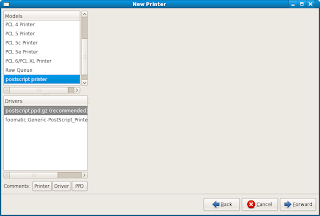
Choose the "postscript printer" and press Forward
And then enter the name displayed on your computer of the printer, and press Forward button.
Click Apply button.

Press the New Printer button

And select "Windows Printer via SAMBA"
Input the smb address "nts27/pstsc-dx" ( if you are a student of SoC and the printer name "pstsc-dx" is the one in Level 1 of COM1)
Then press Forward button

You can directly use the "Generic" and click the Forward button.

Choose the "postscript printer" and press Forward
And then enter the name displayed on your computer of the printer, and press Forward button.
Click Apply button.
Subscribe to:
Posts (Atom)